Re: 猫眼浏览器(Win Release)
发表于 : 2026年 2月 14日 21:26
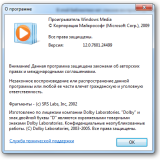
my mFplat more modern than your's
12.0.7601.24499
12.0.7601.24499
[2904:5400:0214/222416.789:VERBOSE1:components\variations\service\variations_field_trial_creator.cc:84] VariationsSeedUsage:12
[2904:5400:0214/222416.789:VERBOSE1:components\variations\service\variations_field_trial_creator.cc:399] VariationsSetupComplete
==========================================================================
[2904:5400:0214/222416.813:VERBOSE1:chrome\browser\media\webrtc\webrtc_event_log_manager.cc:122] WebRTC remote-bound event logging enabled.
[2904:5400:0214/222416.815:VERBOSE1:components\proxy_config\pref_proxy_config_tracker_impl.cc:462] 0x5bb00170680: set chrome proxy config service to 0x5bb001a0380

EXCEPTION_DEBUG_INFO:
dwFirstChance: 1
ExceptionCode: 000006BA (RPC_S_SERVER_UNAVAILABLE)
ExceptionFlags: 00000001
ExceptionAddress: kernelbase.000007FEFD1FB87D
NumberParameters: 0
Первая попытка исключения на 000007FEFD1FB87D (000006BA, RPC_S_SERVER_UNAVAILABLE)!
DLL загружена: 000007FEFB960000 C:\Windows\System32\powrprof.dll
Поток 5820 создан, Точка входа: chrome.000007FED20267F0, Параметр: 000000F100920060Исключение SetThreadName на 000007FEFD1FB87D (16BC, "ThreadPoolSingleThreadCOMSTASharedForegroundBlocking7")
Поток 2920 создан, Точка входа: chrome.000007FED20267F0, Параметр: 000000F100EB4800Исключение SetThreadName на 000007FEFD1FB87D (B68, "ThreadPoolForegroundWorker")
DLL загружена: 000007FEFC2C0000 C:\Windows\System32\FirewallAPI.dll
DLL загружена: 000007FEFC970000 C:\Windows\System32\cryptsp.dll
EXCEPTION_DEBUG_INFO:
dwFirstChance: 1
ExceptionCode: 000006BA (RPC_S_SERVER_UNAVAILABLE)
ExceptionFlags: 00000001
ExceptionAddress: kernelbase.000007FEFD1FB87D
NumberParameters: 0
Первая попытка исключения на 000007FEFD1FB87D (000006BA, RPC_S_SERVER_UNAVAILABLE)!
Отладка: C:\Program Files\CatsxpSoftware\Catsxp-Browser\Application\catsxp.exe
Файл базы данных: C:\Users\bomzzz\Desktop\snapshot_2025-08-19_19-40\release\x64\db\catsxp.exe.dd64
Процесс запущен: 000000013F190000 C:\Program Files\CatsxpSoftware\Catsxp-Browser\Application\catsxp.exe
"C:\Program Files\CatsxpSoftware\Catsxp-Browser\Application\catsxp.exe"
argv[0]: C:\Program Files\CatsxpSoftware\Catsxp-Browser\Application\catsxp.exe
Точка останова по адресу 000000013F1AFA20 (TLS Callback 1) установлена!
Точка останова по адресу 000000013F2FC730 (TLS Callback 2) установлена!
Точка останова по адресу 000000013F20FFB0 (TLS Callback 3) установлена!
Точка останова по адресу 000000013F2FBC80 (TLS Callback 4) установлена!
Точка останова по адресу 000000013F196E80 (TLS Callback 5) установлена!
Точка останова по адресу 000000013F23CBB0 (TLS Callback 6) установлена!
Точка останова по адресу 000000013F2FD5E0 (останов в точке входа) установлена!
DLL загружена: 0000000077430000 C:\Windows\System32\ntdll.dll
DLL загружена: 0000000077310000 C:\Windows\System32\kernel32.dll
DLL загружена: 000007FEFD1F0000 C:\Windows\System32\KernelBase.dll
Точка останова по адресу 000007FEEAE26CB0 (TLS Callback 1 (chrome_elf.dll)) установлена!
Точка останова по адресу 000007FEEAE90580 (TLS Callback 2 (chrome_elf.dll)) установлена!
Точка останова по адресу 000007FEEAE25B30 (TLS Callback 3 (chrome_elf.dll)) установлена!
Точка останова по адресу 000007FEEAE8F250 (TLS Callback 4 (chrome_elf.dll)) установлена!
Точка останова по адресу 000007FEEADD4C50 (TLS Callback 5 (chrome_elf.dll)) установлена!
Точка останова по адресу 000007FEEAE1D060 (TLS Callback 6 (chrome_elf.dll)) установлена!
DLL загружена: 000007FEEADB0000 C:\Program Files\CatsxpSoftware\Catsxp-Browser\Application\145.6.2.2\chrome_elf.dll
DLL загружена: 000007FEFC2B0000 C:\Windows\System32\version.dll
DLL загружена: 000007FEFD7F0000 C:\Windows\System32\msvcrt.dll
Достигнута системная точка останова!